Tyler Gillespie
Chief Design Officer


This month we closed that gap.
August was driven by our Raving Fans initiative — the discipline of taking what our customers and the market are asking for and shipping it fast, in full. Both of this month's headline releases came directly from that pipeline. One of them, custom permissions, we previewed to you last month and delivered this month. The other, the holdings layer, is the deepest structural addition we've made to the platform this year.
And a third thing happened in August that we didn't build — our customers did it for us. More on that at the end
1 — The Holdings Layer: See Through Your Investments
Until now, an investment was the deepest layer of the platform. You could see a fund, a direct position, a liability, and everything we could tell you about it. Now there's a floor beneath the floor.
Every investment fund or vehicle now carries its own holdings, across all of your public and private accounts.
Underlying holdings, reported over time
Open any investment and select the new Holdings tab. You'll see the underlying portfolio companies and securities inside that position, with reported values laid out quarter by quarter — or switched to annual with a single toggle. Every holding expands. Every period is preserved. Total reported value rolls up automatically at the bottom of the table.
This is the view that answers questions that used to require a phone call. Which of my managers hold the same asset? Where did the mark move, and in which quarter? What actually drove this fund's performance last year?
The answers are in the platform now, not in a PDF.
For direct investments: accounting-level depth
Direct investments get a different kind of depth, because they demand it. Where you own the asset outright, you can now bring the accounting itself into the platform — balance sheets, income statements, and cash flow statements — sitting alongside the position rather than in a separate system.
The operating detail and the portfolio view finally live in one place.
Drill straight through the consolidated portfolio
The holdings layer isn't confined to individual investment pages. It's built into your consolidated portfolio and its visual controller.
The allocation chart now renders in concentric rings — asset class on the inside, investments in the middle, individual holdings on the outer edge. Hover any segment and it resolves to a single named position and its value. Toggle between NAV and Deployed Capital to change the basis of the entire view. Move between Assets and Liabilities, filter to Internal or External, and set the window to 1Q, 1Y, 3Y, or life-to-date. Filter by asset class — Private Credit, Private Equity, Real Estate, Royalties, Hedge Fund, Infrastructure, Venture Capital — and the rings redraw around your question.
Alongside it: annualized return, annualized volatility, allocation percentage, investment count, average NAV, and manager and operator counts, all moving with whatever view you've selected.
Same portfolio. Considerably further to see.
2 — Custom Permissions: Now Live
We previewed this last month. It's live today.
Global read and write access was never a real answer for a family office. The analyst, the outside accountant, the next-generation family member, and the principal do not need the same view — and in most offices, the reason they all had the same view was that the software gave no other option.
Now you can build roles around how your office actually operates.
Custom roles control who can use features, view content, and make edits. Those are three separate questions, and until now the platform answered them as one. An administrator defines a role and decides, resource by resource, whether it carries Read, Modify, or Delete — across Investments, Documents, Entities, Liabilities, Ledger, Due Diligence, Benchmarking, Data Entry, Integrate Financials, Email Forwarding, and more. That's dozens of discrete permissions inside a single role definition.
An outside CPA can be given read access to the ledger and nothing else. A junior analyst can enter data without the ability to delete it.
Administrators can provision accounts directly. Adding someone to the platform no longer requires a request, a ticket, or a wait. Admins create the account, assign the role, and the user is working. The full user directory shows status, join date, and filtering across your whole office.
One account, many organizations. A user account can now be linked to multiple organizations, and switching between them takes a single click from the dashboard — no second account, no logging out, no re-authenticating. For the advisor covering three families, or the family member with interests across several structures, the account follows the person rather than the entity.
Auto-grant for future permissions. As we ship new capabilities into the platform, you decide in advance whether a role inherits them automatically or waits for your explicit approval. Your permission structure doesn't decay every time we release.
Team management in one panel. Invite users, see seat usage, and assign or reassign roles from Settings → Team.
The result is that more of your people can safely be in the platform. That's the point. Data that only one person can reach isn't shared infrastructure — it's a bottleneck with a login screen.
3 — Sterling Is Now How Documents Enter the Platform
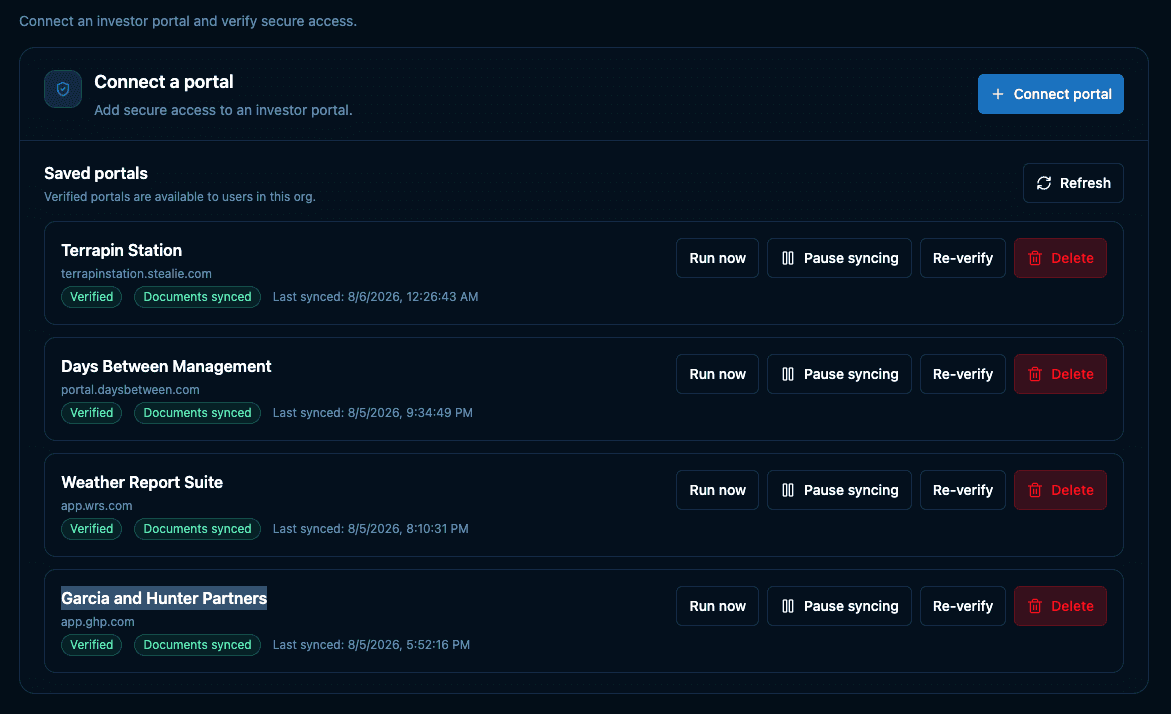
We introduced Sterling, our proprietary portal retrieval system, in July. We had a thesis about it: that the manual work of logging into portal after portal, downloading document after document, was a large enough burden that solving it properly would change how the platform gets used.
98% of all documents now entering the platform come through Sterling.
That number is the part of this update we're proudest of, and it isn't a feature we shipped in August — it's what our customers did with a feature we shipped in July. Adoption that fast, that completely, is the clearest signal we could ask for that a proprietary retrieval system is the right answer for family offices and their portals.
Connect a portal once and it's on autopilot. Sterling retrieves, extracts, tags, and saves every document, then visualizes the data in your dashboards. It doesn't stop working on your behalf.
Advancements to Sterling continue to roll out. If you missed the announcement, it's worth the read.
4 — Under the Hood
Multi-organization access is the piece of this release that looks smallest and took the most work. Letting one account belong to several organizations means identity has to be separable from the organization it operates in — permissions, roles, and data boundaries all resolve per organization, evaluated fresh on every switch. Done poorly, that leaks. Done properly, the switch is instant and the walls hold.
The holdings layer required its own rework: extending the investment data model to carry nested positions and time-series reported values, without disturbing a single existing record.
What This Adds Up To
Our internal kaizen practice is simple: nothing is finished, and small improvements compound. Our Raving Fans initiative pairs it with an external ear — build what customers are actually asking for, and build it before they ask twice.
August is what those two things look like when they meet. A feature we promised in July, delivered in August. A depth of visibility our customers asked for, shipped as a first-class layer of the platform rather than a report bolted on the side. And a July release that our customers adopted almost completely inside of a month.
We're building the platform we always wished existed when we were in the investor seat. And we're just getting started.